How to Make a Sudoku or Puzzle Book for Amazon KDP (Step by Step)
Puzzle books are one of the most popular kinds of low-content books on Amazon KDP, and many teachers create them as a side project or for their own students. The work is not in drawing puzzles — tools can generate them — but in planning a book people want: the right audience, the right difficulty curve, clean pages and a clear answer key. This guide takes you from idea to an upload-ready interior PDF.
- Step 1 — Choose a clear niche
- Step 2 — Pick a trim size
- Step 3 — Plan the interior
- Step 4 — Generate the puzzles
- Step 5 — Margins, page numbers and copyright
- Step 6 — Export the interior PDF
- Step 7 — Cover and listing
- Ideas for puzzle book series
- Using the book in your own classroom
- Quality checklist before you publish
Step 1 — Choose a clear niche
“Sudoku book” is crowded. A specific promise sells better: “Killer Sudoku for Beginners”, “Large-Print Sudoku for Seniors”, “6×6 Sudoku for Kids Ages 7–9”, “Numberlink Puzzles for Kids”, or a variety book with one new rule per chapter. Decide who the reader is, what level they have, and what makes your book different (variants, stories, large print, rising difficulty).
Step 2 — Pick a trim size
| 8.5 × 11 in | Large print, kids’ activity books, one big puzzle per page |
|---|---|
| 8 × 10 in | Kids’ books with slightly smaller pages |
| 6 × 9 in | Travel-size adult puzzle books, one or two puzzles per page |
| 8.5 × 8.5 in | Square books, picture sudoku for young children |
Both the Sudoku Variety Studio and the Numberlink Puzzle Maker include these KDP trim sizes in the paper menu (plus 5×8, 5.25×8, 5.5×8.5, 7×10 and 8.25×11).
Step 3 — Plan the interior
- Title page and instructions: rules for every puzzle type used in the book.
- Puzzle pages: decide puzzles per page (larger for kids and seniors).
- Difficulty curve: start easy and finish hard — readers love to feel progress.
- Answer key: at the back, several solutions per page.
- Page count: KDP paperbacks need at least 24 pages; puzzle books are commonly 100–150 pages.
Step 4 — Generate the puzzles
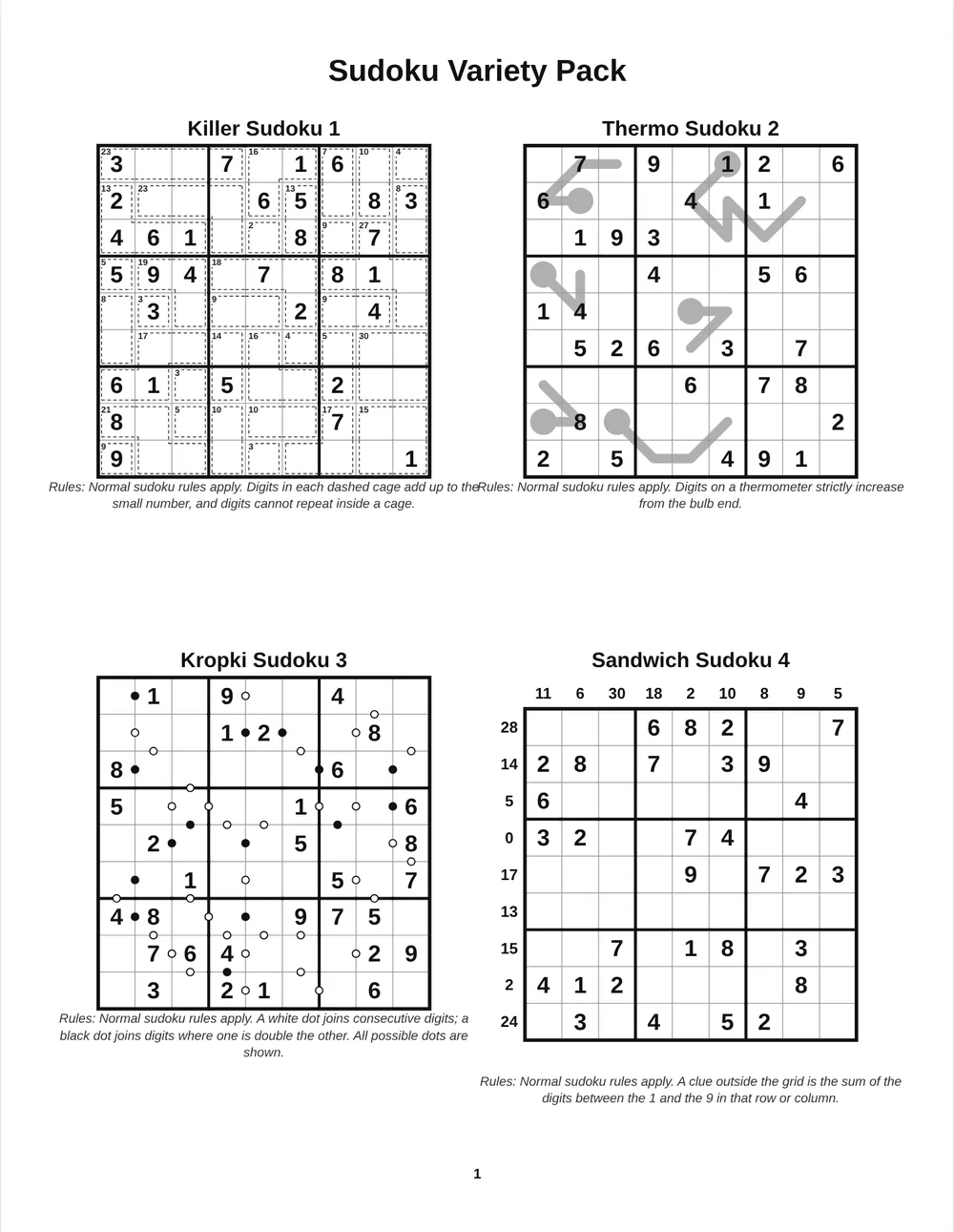
In the Sudoku Variety Studio, click ✨ One-click book, choose a book type (Variety, Classic, Kids, Line puzzles or Killer & cages), the number of pages and grids per page. The tool builds the book with difficulty rising from Easy to Extreme, rules under each grid, page numbers and a compact answer key. For Numberlink, use the Bulk tab with “Increase difficulty through the book”. Every puzzle in both tools has exactly one solution — essential for good reviews.
Step 5 — Margins, page numbers and copyright
KDP requires safe margins inside the trim, and the inner (gutter) margin must be larger for thicker books. Set the margin in Layout & margins to at least 0.5 in for most books (0.625–0.75 in for books over 150 pages). Turn on page numbers and choose the outer position so numbers alternate left and right like a printed book; set the starting number to account for your title pages. Add your copyright line in the footer.
Step 6 — Export the interior PDF
Export PDF at 300 dpi — the standard for print. Check that the page size matches your chosen trim, open the PDF and flip through every page: the difficulty curve, the answer key order and the page numbers. Combine your title page, instructions and puzzle pages with our free Merge PDF tool if you made them separately.
Step 7 — Cover and listing
The cover sells the book: a clear title, the audience (“for kids”, “large print”), the number of puzzles and a bold image of a puzzle. In the listing, describe the puzzle types, the difficulty levels, the trim size, and mention that solutions are included. Use the keywords readers actually search for, such as “killer sudoku for beginners” or “puzzle book for kids 8–10”.
Ideas for puzzle book series
- By level: Beginner, Intermediate, Expert editions of the same puzzle type.
- By age: sudoku for ages 6–8 (4×4 and 6×6), 8–10 (6×6 and easy 9×9), teens and adults.
- By theme: story-mode books (space, pirates, detectives) for children.
- By variant: a book each for killer, thermo, sandwich or mixed variants.
- Mixed puzzle books: sudoku plus Numberlink plus mazes for a varied activity book.
A series lets readers who enjoyed one book find the next, and each new book builds on the layout and settings you already saved as a project file.
Using the book in your own classroom
A puzzle book you design is also a great classroom resource: print a copy for the class library, give chapters as weekly challenges, or send the answer key to families. Because the project file can be saved and reopened, you can make a new edition every year with fresh puzzles and the same layout.
Quality checklist before you publish
- ✅ Every puzzle has one solution and the answer key matches.
- ✅ Rules are explained for every puzzle type.
- ✅ Difficulty increases steadily.
- ✅ Margins respect KDP minimums; page numbers are correct.
- ✅ Fonts are clear and large enough for the audience.
- ✅ Interior PDF exported at 300 dpi in the correct trim size.
Before publishing, read KDP’s current formatting and content guidelines, and make sure the book offers real value — a focused theme, good puzzles and clear instructions.
Create your own puzzles in minutes
Unique solutions · answer keys · US Letter, A4 & KDP sizes · PDF, PNG, SVG, PPTX
Start your free day →Frequently asked questions
What size is best for a sudoku book on KDP?
8.5 × 11 in for large print and kids’ books, 6 × 9 in for compact adult books.
How many puzzles should a puzzle book have?
Most puzzle books have 100–200 puzzles across 100–150 pages, with solutions at the back.
Do puzzle books need an answer key?
Yes. Readers expect solutions, and a correct answer key avoids negative reviews.
What resolution should the interior PDF be?
300 dpi is the standard for print.
Can I make a Numberlink book for KDP?
Yes. The Numberlink Puzzle Maker supports KDP trim sizes, bulk pages with rising difficulty and answer keys.
Where should page numbers go?
Outer position (alternating left and right) looks most like a professionally printed book.
Summary
A successful puzzle book is a clear promise to a specific reader, delivered with clean pages, a steady difficulty curve and a correct answer key. Choose your niche and trim size, generate unique-solution puzzles, set margins and page numbers, and export a 300 dpi interior PDF.
More puzzle guides for teachers
We build math worksheets, puzzle makers, answer keys and classroom tools for teachers, tutors and homeschool parents, and keep these guides up to date.